
Email Threat Forwarding
 FAQs
FAQs
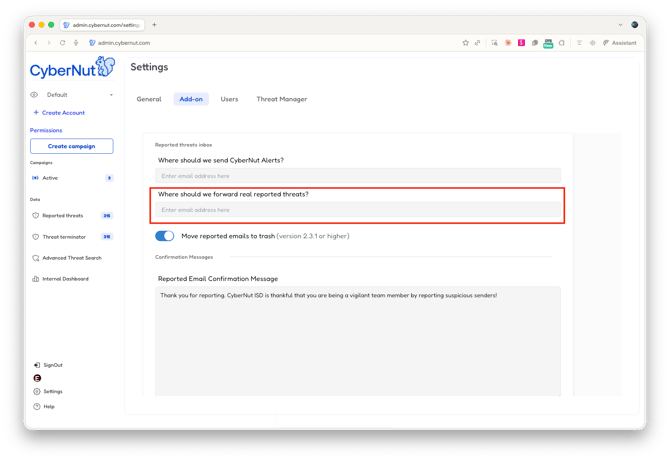
Q: What is Email Threat Forwarding?
A: Email Threat Forwarding allows you to automatically set an email address that receives a copy of any threat reported through the blue squirrel. This allows IT admins to also send those emails to other email security services to scan and assess the risk of the email.
SETUP AND COMPATIBILITY
Q: Does this feature work on both Microsoft 365 and Google Workspace?
A: Yes. Threat forwarding is supported for both Microsoft 365 and Google Workspace accounts. Microsoft 365 support has been available. Google Workspace support is new with this release.
Q: Which services does this work with?
A: It works with any email security platform that can receive a forwarded email to a monitored inbox and process it from there. If your platform supports that, you can use this feature.
Q: What do I need to have in place before using this feature?
A: You need an existing license and active subscription with your email security platform. You also need the specific inbox address that platform uses to receive forwarded threat reports. CyberNUT does not provide or manage that address.
Q: How do I set it up?
A: See instruction here: https://knowledgebase.cybernut.com/cybernut-knowledge-base/reported-email-forwarding
Q: How do I know if forwarding is working correctly?
A: Report an email after saving your configuration and check whether it appears in your configured third-party inbox. If it does, forwarding is working correctly.
HOW IT WORKS
Q: What happens when a user reports an email with threat forwarding enabled?
A: CyberNUT receives a copy of the reported email and your third-party email security platform receives a copy simultaneously. The forwarded email appears to come from the original reporter's inbox address, which allows your security platform to correctly attribute and process the report. Note: CyberNUT training simulation emails are excluded and will not be forwarded.
Q: Will reported emails still show up in CyberNUT's Reported Threats tab?
A: Yes. Reported threats will still appear in CyberNUT, but they will remain in New status indefinitely. Because your email security platform is handling investigation and remediation, CyberNUT will not update the status of those reports. This is expected behavior and not a bug.
Q: Will CyberNUT receive any updates or results back from my email security platform?
A: No. CyberNUT forwards the email but does not receive any status updates, analysis results, or remediation outcomes from your third-party platform. All investigation and resolution happens inside that platform.
Q: If my admin resolves a reported threat inside the third-party platform, what will show up in CyberNUT's Reported Threats dashboard?
A: Nothing will change in CyberNUT. The reported threat will remain in New status regardless of what action is taken in your third-party platform. CyberNUT has no integration with external platforms and receives no notification of actions taken there. The only way a reported threat moves out of New status is if the admin manually updates it inside CyberNUT. If your team manages all investigation and resolution externally, expect to see New items accumulate in CyberNUT over time. This is normal and does not indicate a problem.
Q: Will CyberNUT's Automated Threat Terminator process reported threats for accounts using this feature?
A: Automated Threat Terminator is designed for accounts where CyberNUT manages threat investigation and remediation. If you are using threat forwarding to route reported emails to a third-party platform, ATT is not part of that workflow. These two features serve different threat management approaches.
Q: Will users receive a notification that their reported email was reviewed and addressed?
A: CyberNUT does not send close-loop notifications when forwarding is enabled, because CyberNUT does not receive any information back from the third-party platform. If your email security platform is configured to send close-loop notifications to reporters, those will come from that platform directly.
Q: Are CyberNUT training simulation emails forwarded to my email security platform?
A: No. Training simulation emails are excluded from forwarding. Only real reported emails are sent to your configured third-party inbox.
ACORNS AND USER ENGAGEMENT
Q: Will users earn threat acorns when a reported email is confirmed as a real threat?
A: No. Because remediation is handled by your third-party platform and CyberNUT does not receive confirmation back, the system cannot verify an outcome and acorns will not be awarded for threat reports when forwarding is enabled.
TRAINING EMAIL DELIVERABILITY
Q: Will enabling threat forwarding affect whether my users receive CyberNUT training emails?
A: No. Threat forwarding only applies to emails your users report using the CyberNUT add-in. It has no effect on how CyberNUT training emails are delivered to your users' inboxes. If training emails are being blocked or quarantined by your email security platform, that is a separate whitelisting issue. Contact CyberNUT support and we will help you configure the correct allowlist settings for your platform.