Skip to content
English
  • There are no suggestions because the search field is empty.

Product Updates: Oct 10, 2026 Release

What's New in This Release

We are excited to share the updates below, now available in CyberNut.

The updates are grouped by area to help you quickly understand the enhancements across the product.

Feature Area Enhancement
Advanced Threat Search

Searching for threats across your district's mailboxes could be slow, especially in large districts, and schools on Google Workspace couldn't search by who sent an email. We rebuilt Advanced Threat Search so results come back much faster.

  • Faster results: Find every copy of a phishing email across your district and remove it before more people click.
  • Search by sender for Google schools: Schools on Google Workspace can now search by sender, often the fastest way to find every copy of a phishing campaign.
  • Clear search results: See how many mailboxes were searched and where copies were found.
  • Opens pre-filled from a case: Opening Advanced Threat Search from a case fills in the search form for you.

01 Faster Advanced Threat Search, plus sender search for Google schools (1)

01 Faster Advanced Threat Search, plus sender search for Google schools (2)


Student Phishing Simulations

Students run into different scams than staff do, from fake game rewards and streaming offers to messages that look like the school apps they use every day. We refreshed the student phishing simulation library so students practice spotting the kinds of scams they are most likely to fall for.

  • 33 senders students recognize: EdTech vendors, gaming, streaming and entertainment, food and retail, and prizes and giveaways, across three difficulty levels.
  • Review senders before you launch: Preview each sender's template and turn off any that don't fit your students, as long as at least 8 senders stay on.
  • Automatic for active campaigns: Active student phishing campaigns now use the refreshed senders, and new campaigns can be scheduled starting October 1.

02 Refreshed student phishing simulations (2)

02 Refreshed student phishing simulations (1)


Student Training Reminders and Warnings

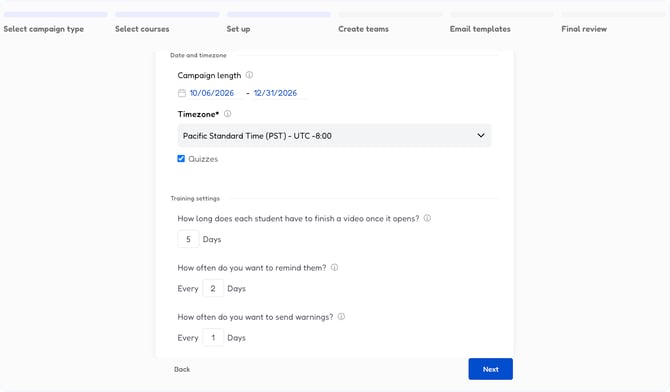
Admins had to chase students who fell behind on training themselves. Student training campaigns now send reminder emails on the schedule you set, and when a module is overdue, students get warning emails until they finish or the campaign ends.

10 Reminders and warnings for student training


Force Password Reset

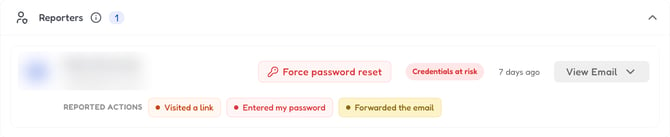
When a reporter says they might have entered their password, admins can now force a password reset straight from the case, without leaving CyberNut. A temporary password is issued in the Dashboard.

05 Force a password reset from a case


Compromised Account Detection

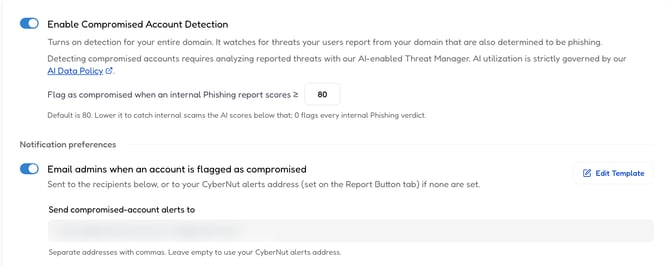
Every district handles risk differently. In Settings, under Compromised Account Detection, you can now decide when an account is flagged and who gets alerted.

  • Set your own threat score threshold: When someone reports a phishing email sent from inside your domain and it scores at or above your threshold, the sending account is flagged. Scores run from 0 to 100, and higher means riskier. Your threshold starts at 0, which flags every internal phishing verdict, the same as before this release. Raise it to flag only higher-risk emails.
  • Auto-suspend uses your threshold: If your district has turned on auto-suspend, a flagged account is locked automatically. The user has to contact IT to reset their password, and IT admins are notified when it happens. This works for both Google and Microsoft accounts. Your threshold also decides when auto-suspend applies. To keep specific accounts from ever being locked, add them to your exception list. Those accounts are still flagged, and IT admins are still notified.
  • Choose who gets alerts: Add up to 10 email addresses. If you leave the list empty, alerts go to the alerts address set on your Report Button tab.
  • Reported actions on Compromised Accounts: See what each reporter did with the email.

03 More control over Compromised Account Detection


Active Threat Manager

Quality of life updates make reviewing reported threats faster.

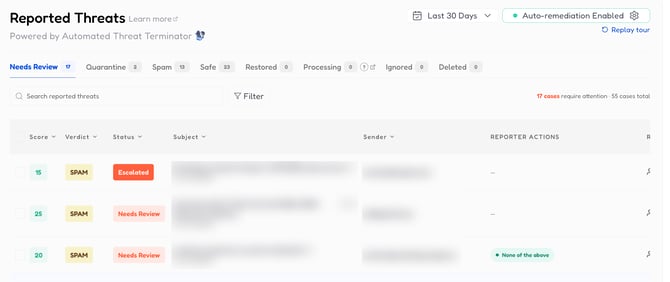
Escalated cases come first: In Needs Review, escalated cases are pinned to the top with a count and a solid red badge. The list also shows your total number of cases.

06 Escalated cases come first

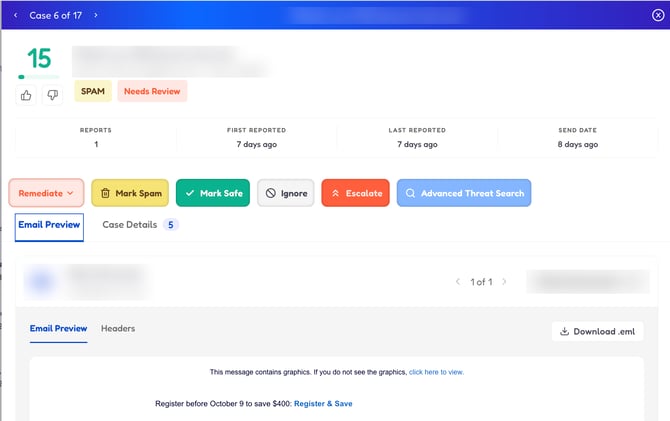
See the email first when you open a case: The old View Email pop-up is gone. The preview now opens automatically inside the case, and the Headers tab shows only the useful fields.

04 See the email first when you open a case

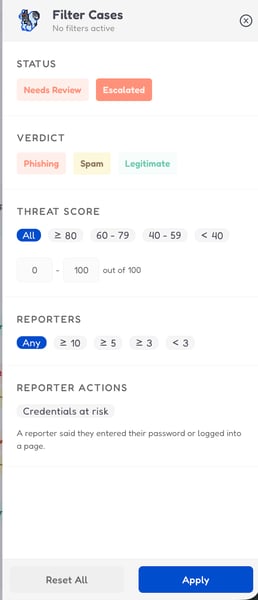
Filter by credentials at risk: Show only cases where a reporter said they entered their password or logged into a page.

07 Filter by credentials at risk

Clear several cases at once: The bulk Action menu now offers the same actions, in the same order and wording, as a single case. New Quarantine All Emails in the Case and Delete All Emails in the Case options act on every case you select. Quarantined emails are deleted automatically after 30 days.

Reporter actions in alert emails:
New-report emails now say what the reporter did, such as clicking a link.

Last 30 days by default: The Reported Threats page now opens on the last 30 days, and the count in the side menu matches the Needs Review tab.

Cases you mark Safe stay Safe: If someone reports an email you already marked Safe, the case is no longer reopened or acted on automatically. It stays in the Safe tab.


Automated Threat Terminator improvements

Clean-ups now find more emails and report their status correctly.

  • Alerts reach every recipient, even if one address on the list is invalid.
  • Microsoft 365 searches find emails whose subject contains extra spaces.
  • Clean-ups handle unusual email IDs more safely and act only on an exact match.
  • A clean-up that's still running is no longer marked as failed, and "Scan complete" always shows when a scan finishes.
  • Accounts with more than one Google or Microsoft domain can pick campaign groups and find members on the right domain.
  • Fixed a bug that awarded too many threat acorns for a single report.
  • Clean-ups no longer come back empty because of how an email’s ID or a missing subject was searched.
  • Gmail clean-ups find emails whose ID contains a | character.
  • When an email was already removed, the clean-up says so instead of reporting zero matches.
  • Microsoft 365 clean-ups no longer leave a case stuck on Processing when an email has a very long subject.
Campaign Creation Flow Updates

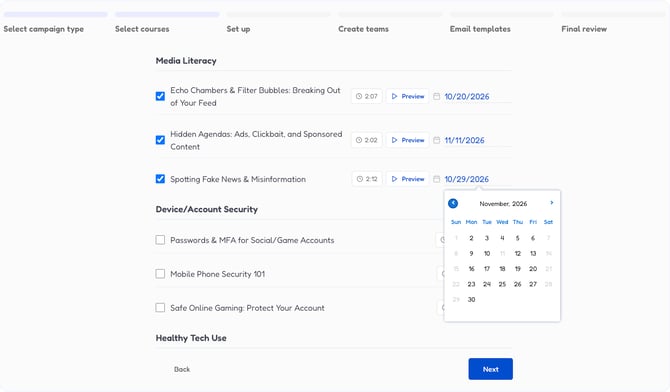
Pick courses first, then set up the campaign. Staff compliance and student video campaigns now follow the same steps, you can set a date for each video, and the first module can start on the campaign start date.

09 Easier training set-up


Campaign Reporting
  • Micro-learning numbers add up: Each session counts once, so completed can no longer be higher than sent. The micro tutorial no longer affects stats, acorns or risk scores.
  • Campaign pages show their data again: The Users tab, Leaderboard tab and overview cards are filled in.
  • Top clicked categories are correct: The chart shows the phishing type, such as Brand Impersonation.
  • Exports cover every campaign version: Exports show whether each person is active or inactive, which is why an export can list more users than the active count on your dashboard.
  • Active campaigns show on the dashboard: Active campaigns that were missing from the dashboard appear again.
  • Users Clicked and Total Clicks agree: The two numbers on the campaign dashboard are now consistent.
  • Unique team names in the Activity filter: Teams with the same name can be told apart.
Compliance Videos and Templates

Reminder and warning email templates display correctly, and module 20 has been added.

Chrome Extension and Report Button

Faster Gmail: The CyberNut Chrome extension was slowing down Gmail and using too much memory. It no longer does.
No more “Network or Server error”: Staff with SSO no longer see this error when they click the report button.

Training and Simulation Emails

Progress saves: Refreshing the page no longer restarts a training.

Cleaner clue highlighting: Highlighted clues use a clean animated line, and hovering a clue hides the other flags.

Simulations stay out of your threat queue: Simulation emails are logged once, which keeps them from being reported back to you as real threats.

Reporting Gift Card simulations: Fixed an issue with reporting gift card simulations