Log in
- Go to https://universal.neptunenavigate.com.
- Log in with your school’s single sign-on (SSO) option.
- Find your modules
Your course level is already set based on your grade, so your modules are ready for you when you log in.
Your modules are listed in order on your Dashboard. They unlock one at a time, so you’ll complete them from first to last. - If your teacher asks you to work on a different module, open it from Student Courses in the menu on the left.
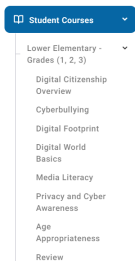
- Select the module you want to work on.
- Click the red Yet to Start button next to the first lesson in the module.
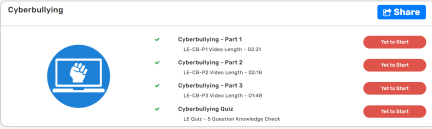
- Complete the lessons in order. You can’t skip lessons, because each one must be finished before the next one opens.