Log in
- Go to http://universal.neptunenavigate.com.
- Log in with your school’s single sign-on (SSO) option.
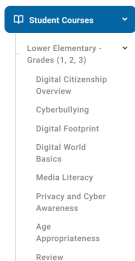
- In the menu on the left, go to Student Courses, then select the course level and module.
- Click the red Yet to Start button next to the first lesson in the module.
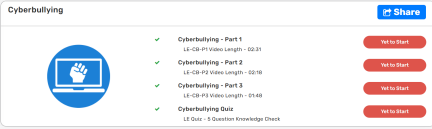
- Complete all lessons in the module in order.
Students log in at https://universal.neptunenavigate.com using your school’s SSO option.
- Course level: Students are assigned a course level based on their grade when your school’s student list is loaded into CyberStudent (rostering).
- Module order: On the student Dashboard, modules are listed in order and unlock one at a time, so students complete them from first to last.
- Working out of order: Students can open any module from Student Courses in the menu on the left.
- Lesson order: Within a module, students start by clicking the red Yet to Start button for the first lesson. They can’t skip lessons, because each lesson must be finished before the next one opens.