
Click below for a full screen walkthrough video.
▶️ Enabling Directory Sync for Google
▶️ Enabling Directory Sync for Google
Part 1: Update Domain Wide Delegation Scopes
- Log in to the Google Admin Console at https://admin.google.com
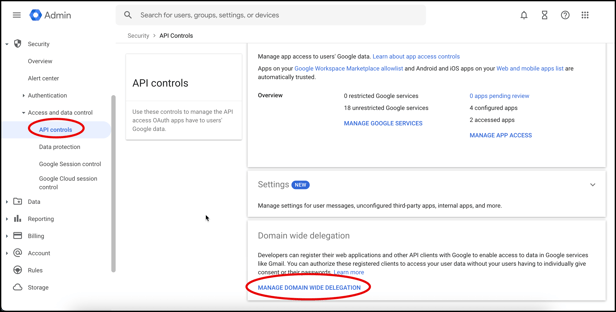
- Click Security> Access and data control> API controls. Then click Manage Domain Wide Delegation.
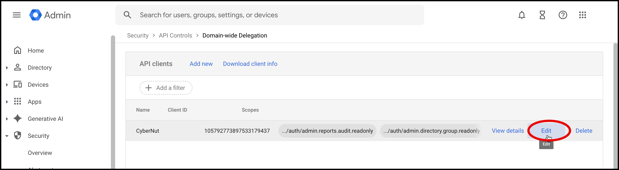
- Click Edit on the row with CyberNut listed.
- Scroll down and paste the following OAuth scope and click Authorize and then Confirm.
https://www.googleapis.com/auth/admin.reports.audit.readonly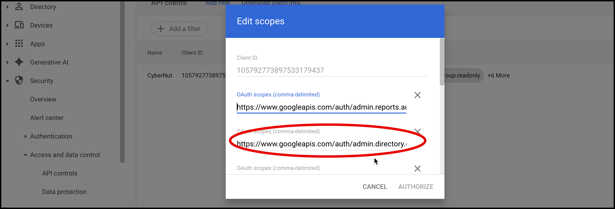
Part 2: Enable Directory Sync in CyberNut Admin Portal
- Login to the CyberNut Admin Portal at http://admin.cybernut.com
- Click Settings in the bottom left corner.
- Click Users, scroll down and turn on Enable Directory Sync.
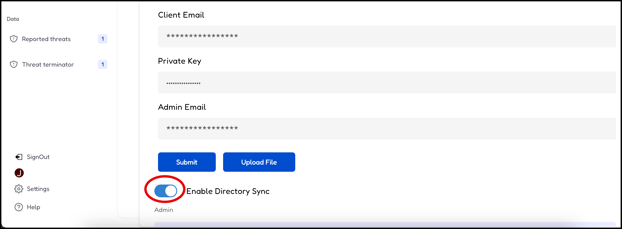
Note: It may take up to 24 hours before you can enable this feature once you have updated the OAuth scope.